
Advanced Task Cleaner 2.02.9.0 - Google Play
You'll be able to see results in few seconds.
Publisher Description
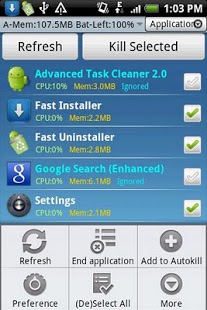
Cleaning running applications.
Uninstall apps.
Making your android phone speed up and saving battery!
FOR android 2.2 and above users
-------------------------------------------
In Android 2.2(and above), the SDK has been changed where terminating applications will not end the associated services and notifications.
So We Add some features for 2.2 users as below:
1.Press app item and choose "End Task" option from pop up menu, if you want to kill an app. it will switch to App Info View,Tap the "Force Stop" button please.
2.It will auto switch to Running Services View(system provided) to end services,after clicking "end task" button.
HOW TO USE
-------------------------------------------
It's Pretty simple:-)
1.Launch this application and take a look at the running applications list, uncheck some applications you don't want to kill (Such as some system applications). Tap the menu "End Application", it will kill all checked applications.
2.Click item to kill/switch/uninstall/see detail tasks in application view tab.
3.Long press item to add/remove ignore list,add/remove auto-kill,manage auto-kill list in application view tab.
4.Long press item to manage,uninstall,switch to/find in market in uninstall view tab.
5.Auto start type : Launch Application , Service only(default) or None when boot.
6.Click tool bar to hide/show tab.
7.Enable Auto-kill Service ,if you want to auto-kill tasks.
8.Long press to add task clean widget on home screen.
9.If force close,send bug report to us by menu->preference->Bug Report.
NOTICE
-------------------------------------------
1.In Android 2.2(and above), the SDK has been changed where terminating applications will not end the associated services and notifications.So it will auto switch to Running Services View(system provided) to end services,after clicking "end application" menu.
2.Make the show ignore app setting checked, the ignore app will be displayed in application tab.
3.The Startup clean scale is same as Widget's kill all apps. Actually it means kill all tasks which exclude ignore list and some system required tasks.
4.If Widget Press Action has been changed ,please remove the widget from Home Screen and add it again!
5.Hide the Notification message when the phone screen is from off to on and no task to kill.
6.When AutoStart type is "Service only", means my app will run in background after reboot.
7.If you pressed Menu->Completely Exit, all functions will be terminated except the widget.
8.You can add widget to clean task by scale mode or set different apps to be killed at different times using the interval options!
NOTES
-------------------------------------------
1.Auto-kill function only kills tasks which is in this auto-kill list.Be careful on what you intend to insert in the auto-kill list.
2.this auto-kill function runs when the screen goes off or enters sleep mode or interval mode.
3.Interval Auto-kill Service auto-kill tasks by interval mode. Set the interval of auto-kill in auto-kill list view.
4.When first init this app, Message,Gmail,Home and this app will be auto added to the ignore list.
5.About widget,You can change Widget Press Action from Menu->Preference->Widget Setting.
6.Menu->Completely Exit to kill this app.
7.In All App tab shows all running apps which contains system app.I suggest that clean tasks in application tab is better.
8.If Message app is killed,you don't show notification any more when new message arrived.Be care of this please!
KW: taskiller Advanced Task killer taskmanager taskpanel process manager panel app memory ATK uninstaller.
Any problem and suggestion please EMAIL me.
About Advanced Task Cleaner 2.0
The company that develops Advanced Task Cleaner 2.0 is Bright Wallace. The latest version released by its developer is 2.9.0.
To install Advanced Task Cleaner 2.0 on your Android device, just click the green Continue To App button above to start the installation process. The app is listed on our website since 2013-01-26 and was downloaded 0 times. We have already checked if the download link is safe, however for your own protection we recommend that you scan the downloaded app with your antivirus. Your antivirus may detect the Advanced Task Cleaner 2.0 as malware as malware if the download link to com.bright.taskcleaner.activity is broken.
How to install Advanced Task Cleaner 2.0 on your Android device:
- Click on the Continue To App button on our website. This will redirect you to Google Play.
- Once the Advanced Task Cleaner 2.0 is shown in the Google Play listing of your Android device, you can start its download and installation. Tap on the Install button located below the search bar and to the right of the app icon.
- A pop-up window with the permissions required by Advanced Task Cleaner 2.0 will be shown. Click on Accept to continue the process.
- Advanced Task Cleaner 2.0 will be downloaded onto your device, displaying a progress. Once the download completes, the installation will start and you'll get a notification after the installation is finished.
Program Details
System requirements
Download information
Pricing
Version History
version 2.9.0
posted on 2013-01-26
version 2.8.9
posted on 2011-04-03
Several fixes and updates
Disclaimer
Official Google Play Link
We do not host Advanced Task Cleaner 2.0 on our servers. We did not scan it for viruses, adware, spyware or other type of malware. This app is hosted by Google and passed their terms and conditions to be listed there. We recommend caution when installing it.
The Google Play link for Advanced Task Cleaner 2.0 is provided to you by apps112.com without any warranties, representations or guarantees of any kind, so access it at your own risk.
If you have questions regarding this particular app contact the publisher directly. For questions about the functionalities of apps112.com contact us.
